Excel workbook
Budget vs Actual Workbook: Monthly Variances, Flags and a Full-Year Forecast in Excel
Set a budget for each income and expense line, enter your actuals as the months close, and see what is over, what is under and where the year is heading.
$24 one time · example and blank copies · download link by email
Who it is for
Small-business owners and bookkeepers who review the numbers every month and want a clear picture of what changed.
Why it is different
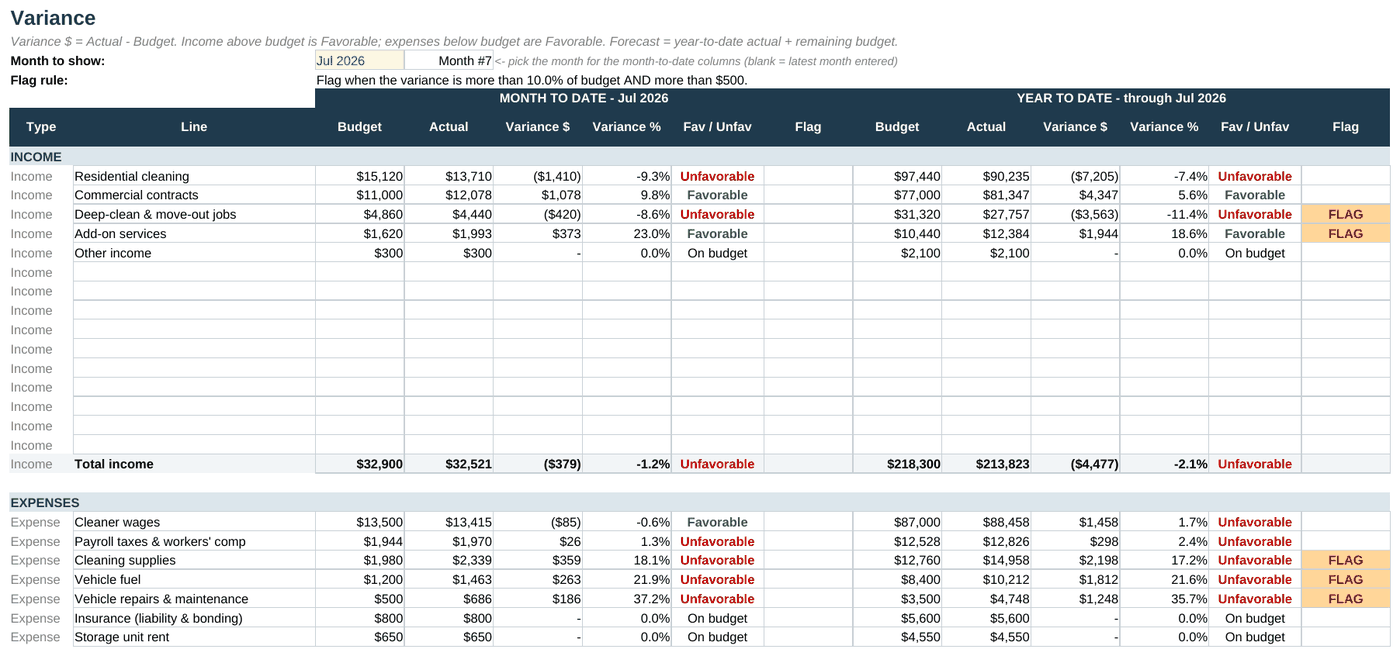
- A line is flagged only when it is off by both a percent and a dollar amount you set, so small lines do not clutter the report.
- Favorable and unfavorable are labelled the right way round for income and for expenses.
- A filled example for an invented cleaning business and a blank copy with working formulas.
What is inside
- Start Here. Purpose, which cells to fill in and how the months are counted.
- Setup. Fiscal year start, months of actuals entered, the dollar and percent thresholds for flags, and your income and expense lines.
- Budget. Each line for twelve months, spread evenly, by seasonal percentages or typed in by month.
- Actuals. Your actual figures for each line and month.
- Variance. Month and year to date against budget, with favorable or unfavorable labelled correctly for income and expenses, flags, and a full-year forecast.
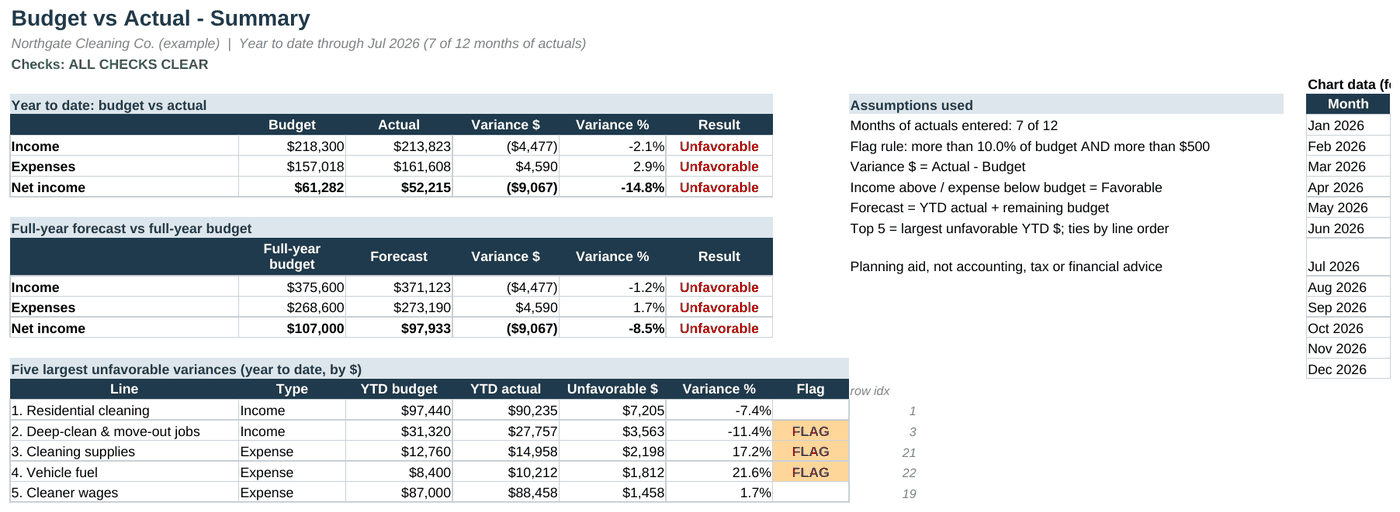
- Summary. One page with year to date results, the full-year forecast, the five largest unfavorable variances and two charts.
- Checks. Seasonal percentages that do not total 100 percent and months or lines with missing data.
A look inside
Example data, real formulas
Get it
Budget vs Actual Workbook
Want every toolkit? The toolkit membership includes all of them, with a lower rate if you pay yearly.
Delivered as a zip of editable Word files and printable PDFs. For one business, your own use. General information and templates, not legal, tax or accounting advice. The forecast adds your actuals so far to the budget for the remaining months, so it is only as good as that budget. Months with no data show as zero on the charts. Not financial, tax or accounting advice. Payment is handled by Stripe. If a file will not open or something looks wrong, reply to your order email and we will make it right.
Free starter
Try a free one-tab version first
A small working Excel file with the same kind of math, filled with made-up example numbers you can type over. We send one confirmation email, and no series follows.
Rather hand it off?
We can keep the books for you each month
If tracking this yourself is more than you want to take on, we do monthly bookkeeping in QuickBooks, Xero or Excel. Tell us what you use and what is behind, and we reply with a written quote after a short review of your books. No obligation.
Get a bookkeeping quote Free books health checkPrefer to keep it yourself but want a hand getting started? Book a 45 minute setup session ($65).
Buy it with the others
Bundle
Business Planning Bundle
This product plus 3 more, in one download.
$79 instead of $106 separately
Bundle
Product Seller Bundle
This product plus 2 more, in one download.
$65 instead of $82 separately
Month-End Close Workbook
A real month-end close in one Excel file. It tells you when a rec does not tie, which variances still need an answer, and when the period is ready to lock.
$19