Paid app
Tallyfinch: bookkeeping software that lives on your computer
Simple double-entry books for freelancers and small service businesses: invoices, bills, bank import, reconciliation, profit and loss and a balance sheet. Your books are one file on your own computer, not in someone else's cloud. Buy it once; a small monthly plan covers updates, and the app keeps working if you stop it.
Paid app
Tallyfinch downloadable bookkeeping software
Tallyfinch is its own software, sold separately from the membership. You pay $99 once for the app and $5 a month for updates. Cancel the plan any time from the billing portal: the app you have keeps working and your data stays yours, you just stop getting new versions. It runs on your own computer and your data stays in a file you own. Read how it works and the questions below first.
Compare all three apps. Already bought it? Email me my access link.
Free trial
Try Tallyfinch free before you buy
Download the full app and record up to 60 entries. No card, no sign-up. Your books stay in a file on your computer.
Download the free trialWhat it looks like
Real screens, filled in with made-up sample data. Select one to open it full size.
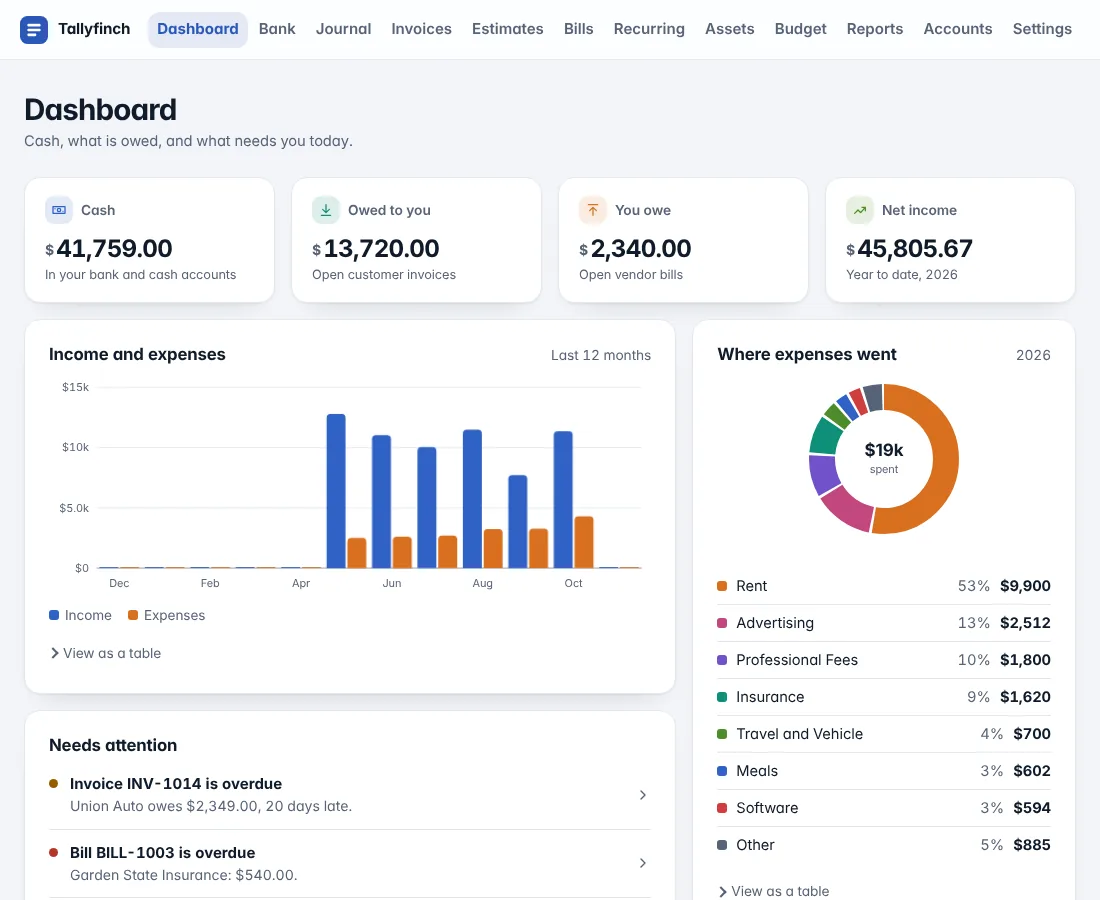
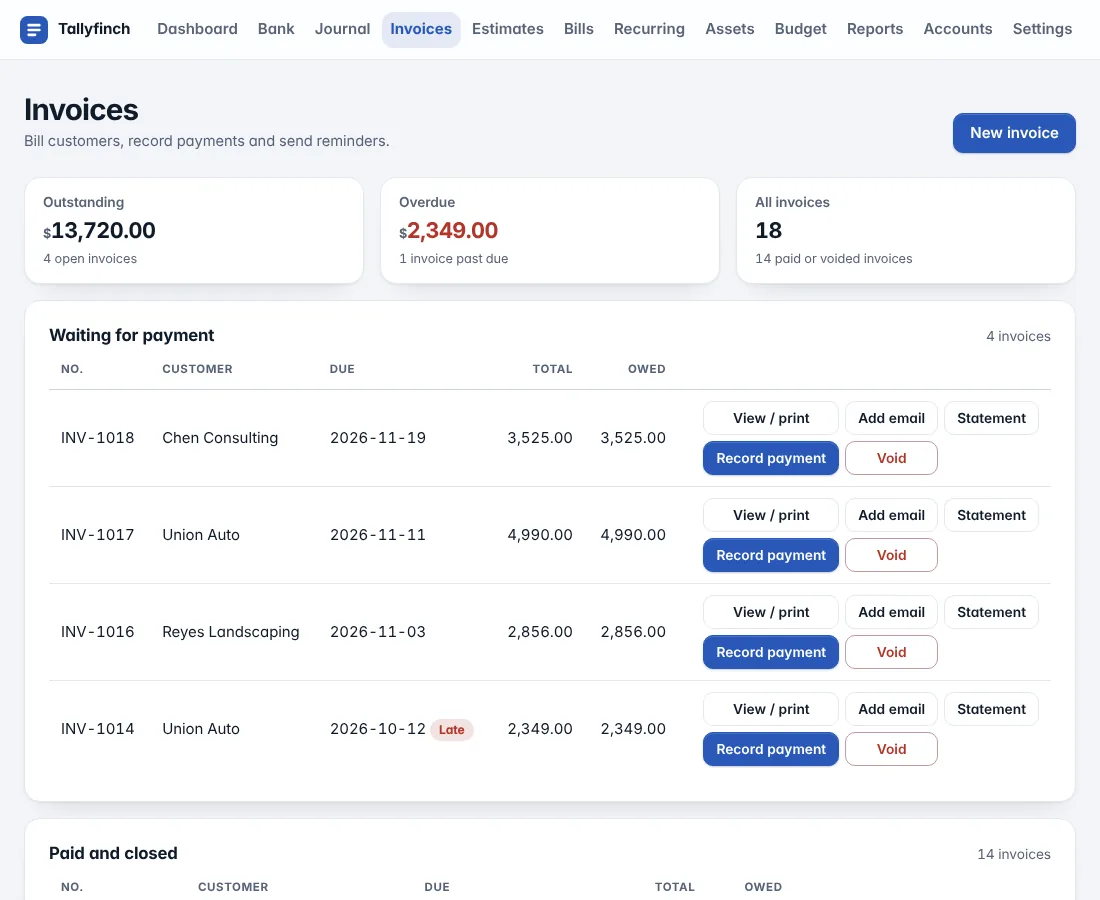
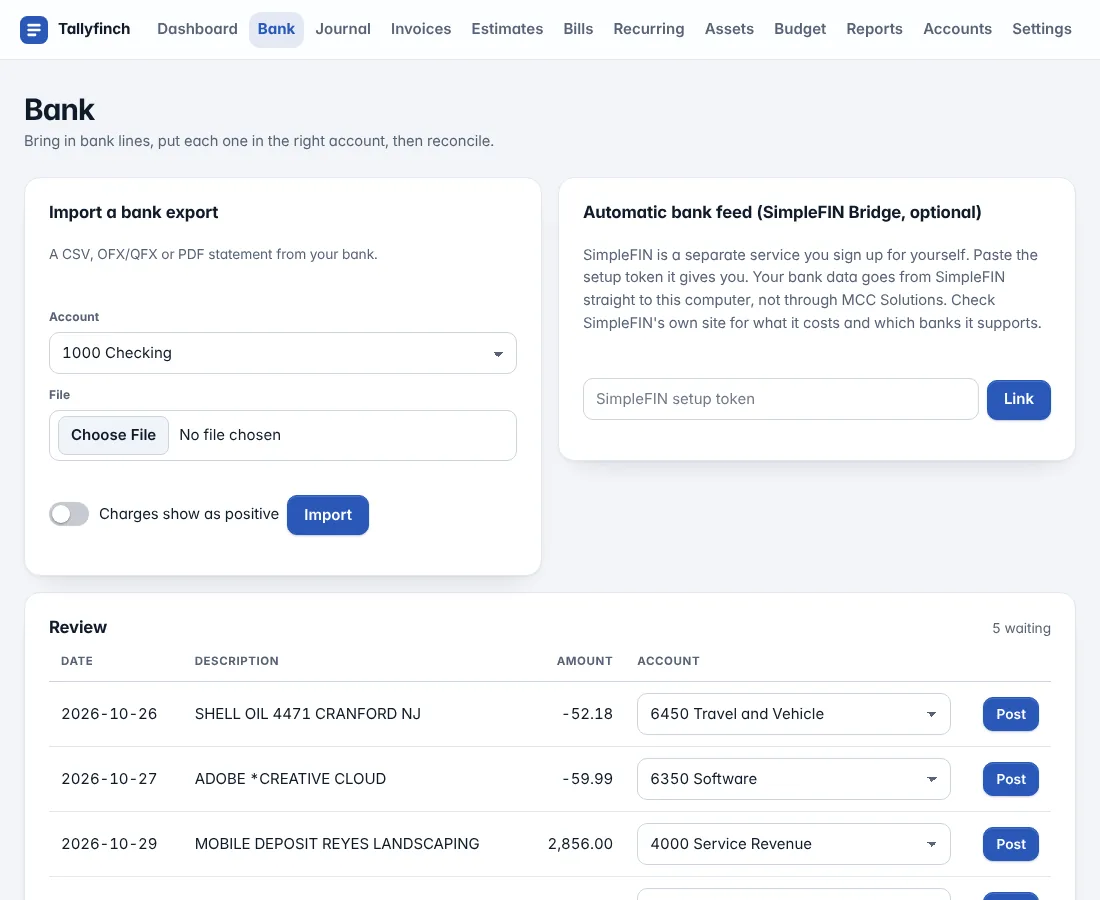
What happens after you buy Tallyfinch
- Pay
Pay at checkout. Your access link is emailed to you and this page unlocks on the device you paid from.
- Download
One zip with a start file for Windows and one for Mac. Double-click it: it finds Python, offers to install it if needed, and opens the app in your browser.
- Use it
The app runs on your computer and your data lives in a file you own. The monthly plan covers updates only: if you stop it, the app you have keeps working.
- Come back for updates
Open this page from your access link any time to download the newest version. Lost the link? Enter your email on this page and we send it again.
Switching from another app? See plain comparisons, including when another product fits better.
How it works
How it works
It runs on your own computer and opens in your browser, reachable only from that machine. You get a chart of accounts from a service, retail or contractor template, balanced journal entries (an entry that does not balance cannot be posted), bank statement import from a CSV, OFX/QFX or a PDF statement with selectable text (it checks the lines against the statement's own totals and tells you when they do not add up; scanned PDFs are not supported), with categorization rules and a review step, reconciliation to your statement, invoices and bills with payments and aging, a profit and loss, balance sheet, trial balance and general ledger, a period lock to close months, an audit log, CSV export and backups. It also tracks projects or jobs with tags (profit and loss by tag), sales tax collected on invoices, recurring entries, budgets against actuals, a fixed-asset register with monthly depreciation, a simplified cash flow summary, vendor payment totals to help with 1099 prep, a year-end close, CSV import of an existing chart of accounts and journal, an optional automatic bank feed through SimpleFIN Bridge (a separate service you sign up for yourself; your bank data goes from them to your computer, and you review every line before it posts), and plugins: your own small Python files that add reports (your own code, so only add ones you trust). Posted entries are never edited: you void them with a reversing entry, so the history stays honest. It needs Python 3.9 or newer and nothing else installed.
What it is not: there is no payroll, no sales tax filing, no bank feed of our own, no multi-user access or cloud sync, no inventory costing and no mobile app. It is built for simple books, such as a sole proprietor, a small service business or a side business. It does not file anything or give tax or accounting advice, so keep backups and have your accountant review anything important.
FAQ
About this calculator
How do updates work?
The app can check for a newer version about once a day, and you can switch that off or press Check now. If there is one it shows what changed and an Update now button. Before replacing itself it checks the file is signed by MCC Solutions, keeps a backup of the version you had, and never touches your data. Checking sends only the app name, the version you have and your order code. You then close and reopen the app. Updates need the monthly updates plan to be active.
How does pricing work?
You pay a fixed price once for the app, and a small monthly fee that covers updates. Both are taken in one checkout through Stripe, and the price and the monthly fee are shown on this page before you buy. You can cancel the monthly updates plan any time from the billing portal. It is sold separately and is not part of the toolkit membership.
What happens if I stop the monthly fee?
Nothing happens to the app you already have: it keeps working fully and your data stays yours. You stop getting updates, and downloading the app again needs the plan to be active, so keep a copy of the app file with your backups. Restart the plan from your access link whenever you want updates again. The app still checks in about once a day to confirm the licence; if it cannot reach us for about five weeks it turns read-only until it can, and your data is untouched. A refund ends the licence.
Can I try it first?
Yes. A copy without a licence is a trial and records up to 60 entries. The demo command shows it with sample data. If your computer is offline for a while, the app keeps working until its current licence runs out (about five weeks) and then asks you to connect and press Check now.
Is this a replacement for QuickBooks?
It covers the core of simple bookkeeping: entries, bank import, invoices and bills, reconciliation and statements. It does not do payroll, sales tax filing (it tracks tax collected, you file it), built-in bank feeds of our own (the optional SimpleFIN link is a third-party service), multiple users or cloud access, so if you need those, a hosted service is the better fit.
Where is my data?
In one SQLite file on your computer that you choose. Copy it to back it up, or use the backup command. We never see it. The only thing the app sends us is the licence check: your order code and email, about once a day.
Can I leave if I want to?
Yes. Export every table to CSV at any time, and the database file itself is a standard format other tools can read.
Is it safe to run?
It listens only on your own computer, requires a one-time token in the link it prints, and rejects requests from other sites. Keep your computer and your backups secure.
Is this accounting or tax advice?
No. It is a record-keeping tool. Have a professional review anything you file or give to a lender.
Is anything saved?
No. The math runs in your browser and nothing you enter is sent to us.
Is this tax or financial advice?
No. It is a calculator for general information. Check the numbers against your own records, and ask an accountant before you act on them.
Related: net profit margin calculator, debt service coverage ratio calculator. See all free tools. More free tools: Wrenfold personal finance software, Gig driver earnings per mile calculator, Reorder point and safety stock calculator, or see all free tools.
Free
Month-End Close Checklist (PDF)
The five-day close, one page to print. Enter your email and we send a link to confirm it is yours, then the download. We may email you about new toolkits, and every email has an unsubscribe link.
General information, not tax or legal advice. How we write and check our tools.