Document pack
South Carolina Employer Compliance Kit 2027: State Checklist, Deadline Calendar and Excel Tracker
The 2027 employer rules for South Carolina in one package: $14,000 SUTA wage base (2026); 1.06% new employer rate; new hires reported in 20 days.
$19 one time · 14-day full refund · Word and PDF · download link by email
Who it is for
Owners, office managers and bookkeepers who run payroll for employees working in South Carolina, from the first hire to the year-end forms.
Not the right fit if
Your employees work outside South Carolina: get that state's kit, or the 2027 Employer Compliance Bundle for several states. Not a payroll service, and not a legal review of your policies.
Why it is different
- Built only from our South Carolina data files, checked November 2026 against 11 official pages, among them South Carolina Department of Employment and Workforce (DEW); SC DEW: Tax Rate Information; Official page; Office of Immigration Compliance: You Must Verify All New Hires through E-Verify, SC LLR; U.S. Department of Labor: State Minimum Wage Laws (updated November 5, 2026); U.S. Department of Labor: Minimum Wages for Tipped Employees (revised July 1, 2026); S. 218 (2017), ratified as Act No. 3 (South Carolina General Assembly); SC LLR Office of Wages and Child Labor: FAQ.
- 4 items the official pages didn't state are marked "not confirmed" with the page to check, never guessed.
- The workbook recalculates with zero formula errors and dates the South Carolina new-hire steps for you.
What is inside
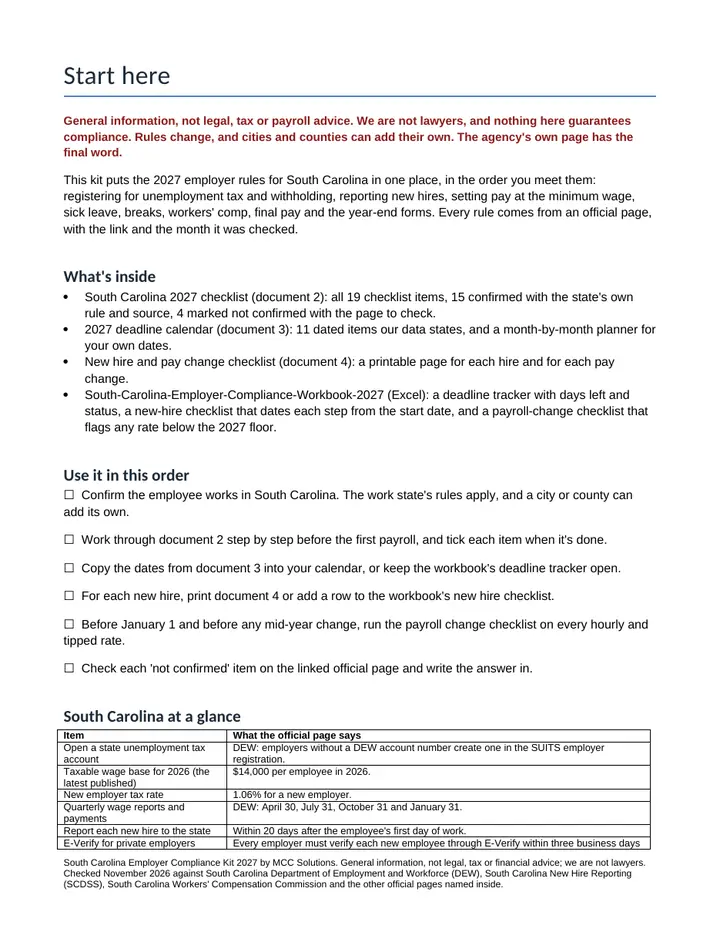
- Start here. How to use the kit, the 15 confirmed South Carolina rules at a glance and the 4 items to confirm, each with the official page to check: taxable wage base for 2027 (SC DEW: Tax Rate Information); state income tax withholding (SCDOR: Form WH-1606 and instructions (Rev. 8/29/23; instructions Rev. 1/4/24)); paid sick leave (S. 218 (2017), ratified as Act No. 3 (South Carolina General Assembly)); breaks for workers under 18 (SC LLR Office of Wages and Child Labor: FAQ).
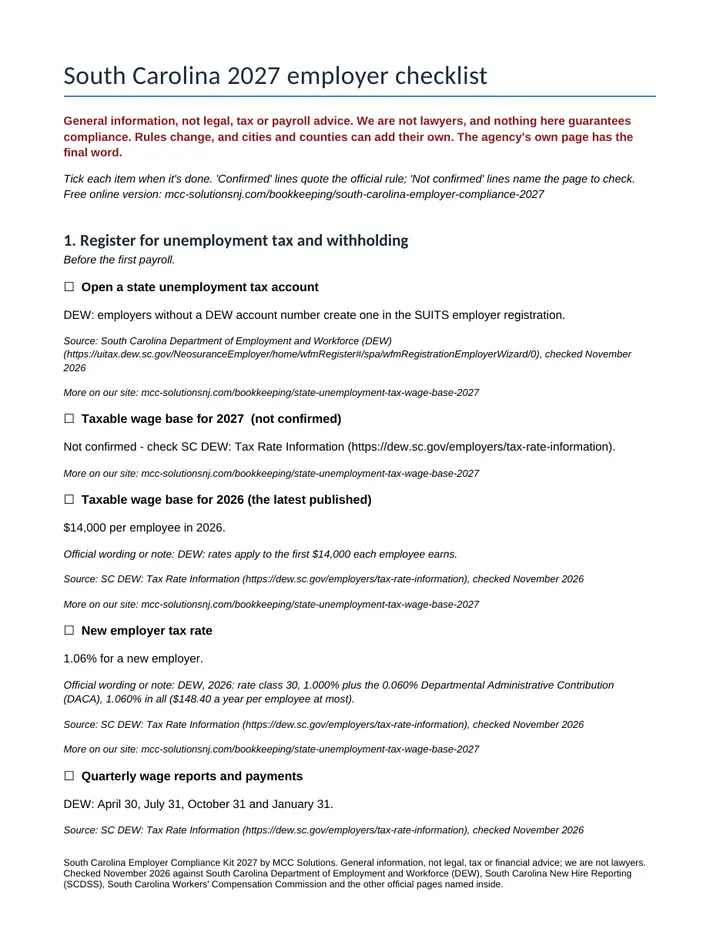
- South Carolina 2027 checklist. Eight steps from unemployment tax registration to year-end filing, each confirmed rule with its source link and check date, from South Carolina Department of Employment and Workforce (DEW), South Carolina New Hire Reporting (SCDSS), South Carolina Workers' Compensation Commission. What it confirms: open a state unemployment tax account: DEW: employers without a DEW account number create one in the SUITS employer registration; taxable wage base for 2026 (the latest published): $14,000 per employee in 2026; new employer tax rate: 1.06% for a new employer; quarterly wage reports and payments: DEW: April 30, July 31, October 31 and January 31; report each new hire to the state: Within 20 days after the employee's first day of work; e-Verify for private employers: Every employer must verify each new employee through E-Verify within three business days after hiring; minimum wage now (2026): No state minimum wage law, per US DOL; minimum wage change in 2027: No state rate; the federal $7.25 continues unless Congress changes it; tipped employees: Cash wage of at least $2.13 an hour in 2027, with tips making up the rest; meal breaks for adults: no state rule; No requirement to give a lunch period; rest breaks for adults: no state rule; No requirement to give breaks; workers' compensation insurance: Businesses that regularly employ four or more employees in the state; final pay when you let someone go: Within 48 hours of the separation or by the next regularly scheduled payday, which may not be more than 30 days; final pay when an employee quits: Within 48 hours of the separation or by the next regularly scheduled payday, which may not be more than 30 days; state copies of W-2s and 1099s: Only include 1099s with South Carolina tax withheld (Form WH-1606), and only file 1099 forms that have South Carolina withholding (Form WH-1612).
- 2027 deadline calendar. 11 dates our South Carolina files state: 4 quarterly due dates from South Carolina Department of Employment and Workforce (DEW); 2 state W-2 and 1099 filing dates from South Carolina Department of Revenue (SCDOR), with weekend dates flagged and a month-by-month planner for your own.
- New hire and pay change checklist. One page per hire, with the report to South Carolina New Hire Reporting (SCDSS) (new hires reported in 20 days) and the I-9 steps, and one per pay change.
- South Carolina compliance workbook (Excel). The South Carolina dates in a deadline tracker with days left and status, a new-hire sheet that dates each step from the start date (new hires reported in 20 days), and a pay-change sheet that flags any rate below the 2027 floor.
A look inside
The first pages, as you will get them
Get it
South Carolina Employer Compliance Kit 2027
Want every toolkit? The toolkit membership includes all of them, with a lower rate if you pay yearly.
Delivered as a zip of editable Word files and printable PDFs. For one business, your own use. General information and templates, not legal, tax or accounting advice. General information, not legal, tax or payroll advice; we are not lawyers, and nothing here guarantees compliance. Rules change and cities can add their own; check South Carolina Department of Employment and Workforce (DEW) and the other official pages linked in the kit. Payment is handled by Stripe. If a file will not open or something looks wrong, reply to your order email and we will make it right.
Ways to get it
Just this kit, or more
Membership
$29 a month
Every kit and document pack in the store, including new ones. Cancel any time.
See the membershipQuestions
Common questions
What do I get and how is it delivered?
The South Carolina Employer Kit 2027 comes as a zip with four documents, each as an editable Word file and a printable PDF: Start Here, South Carolina 2027 Checklist, 2027 Deadline Calendar, and New Hire And Pay Change Checklist, plus an Excel workbook (South Carolina Employer Compliance Workbook 2027). The download link arrives by email after payment.
Will it open on a Mac, Google Sheets or my phone?
The PDFs open in any PDF reader, and the Word files edit in Word, Google Docs or LibreOffice. The workbook is built for Excel and tested in LibreOffice; it should open in Google Sheets, but not every feature is tested there. If a file will not open or something looks wrong, reply to your order email and we will make it right. If it is not right for you, email us within 14 days of buying for a full refund.
Is this legal or tax advice?
General information, not legal, tax or payroll advice; we are not lawyers, and nothing here guarantees compliance. Rules change and cities can add their own; check South Carolina Department of Employment and Workforce (DEW) and the other official pages linked in the kit.
Is it the right fit for me?
It is made for owners, office managers and bookkeepers who run payroll for employees working in South Carolina, from the first hire to the year-end forms. Skip it if your employees work outside South Carolina: get that state's kit, or the 2027 Employer Compliance Bundle for several states.
Free sample
Try one page first
Get a real page or file from this product by email. We send one confirmation email, and no series follows.
Also from MCC Solutions
Month-End Close Workbook
A real month-end close in one Excel file. It tells you when a rec does not tie, which variances still need an answer, and when the period is ready to lock.
$19
Sales-Channel Profit Tracker
Which channel makes you money, and which one only looks busy? Sales minus cost of goods, shipping, platform and card fees and event costs, by channel, by event and by month.
$24