Document pack
Hawaii Unemployment Checklist: Weekly Work Search Rules, Excel Log and Documents to Gather
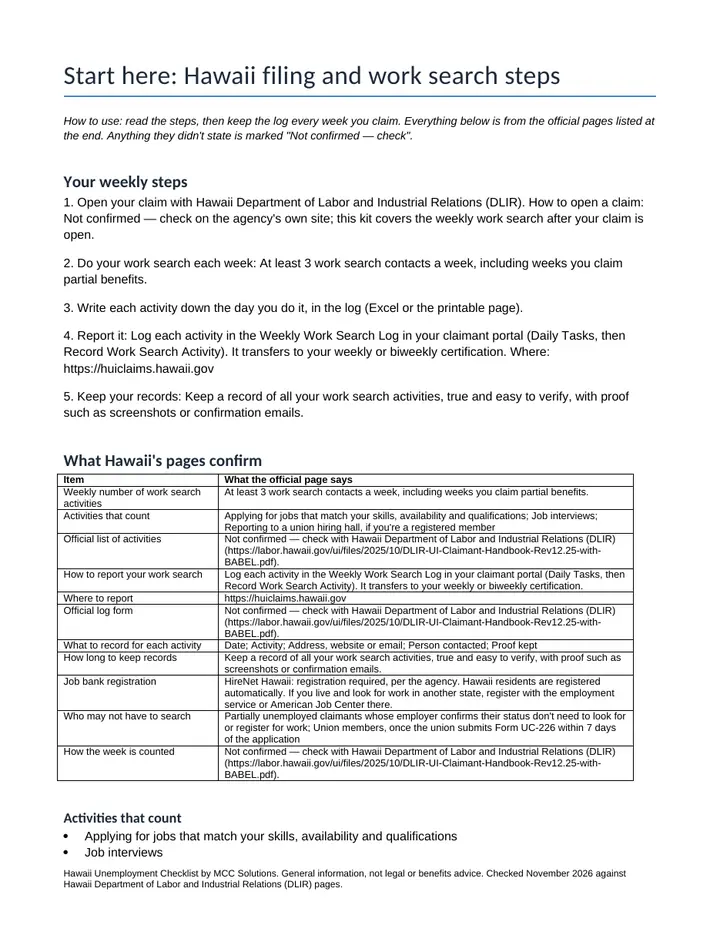
Hawaii's weekly work search rules from Hawaii Department of Labor and Industrial Relations (DLIR)'s own pages, in one checklist: at least 3 work search contacts a week, including weeks you claim partial benefits; report: log each activity in the Weekly Work Search Log in your claimant portal (Daily Tasks, then Record Work Search Activity). It transfers to your weekly or biweekly certification; records: keep a record of all your work search activities, true and easy to verify, with proof such as screenshots or confirmation emails.
$15 one time · 14-day full refund · Word and PDF · download link by email
Who it is for
People claiming unemployment in Hawaii who need to keep a weekly work search record for Hawaii Department of Labor and Industrial Relations (DLIR), and family members helping them stay organized.
Not the right fit if
You claim unemployment in a state other than Hawaii, or you need help with a denied claim or an appeal: this organizes the weekly work search record and doesn't advise on eligibility.
Why it is different
- Built only from our Hawaii work search data file, checked November 2026 against 1 official page: Hawaii DLIR: Unemployment Insurance Handbook (claimant).
- 3 items the official pages didn't state are printed as "Not confirmed — check" with the agency's page, never guessed.
- The Excel summary flags any week with fewer than 3 logged activities, recalculating with zero formula errors.
What is inside
- Hawaii weekly work search log (Excel). A log with the columns Hawaii Department of Labor and Industrial Relations (DLIR) asks for (Date, Activity, Address, website or email, Person contacted, Proof kept), a weekly summary that counts your activities against Hawaii's 3 per week and a documents checklist.
- Start here: Hawaii filing and work search steps. The 8 facts Hawaii Department of Labor and Industrial Relations (DLIR)'s pages confirm, each with its source and check date, and 3 marked "Not confirmed — check": official list of activities, official log form, how the week is counted. The weekly requirement, in the agency's words: At least 3 work search contacts a week, including weeks you claim partial benefits. How to report: Log each activity in the Weekly Work Search Log in your claimant portal (Daily Tasks, then Record Work Search Activity). It transfers to your weekly or biweekly certification. Activities Hawaii counts: applying for jobs that match your skills, availability and qualifications; job interviews; reporting to a union hiring hall, if you're a registered member. Records: Keep a record of all your work search activities, true and easy to verify, with proof such as screenshots or confirmation emails. Job bank: HireNet Hawaii (registration required). Who may not have to search, per the agency: partially unemployed claimants whose employer confirms their status don't need to look for or register for work; union members, once the union submits Form UC-226 within 7 days of the application.
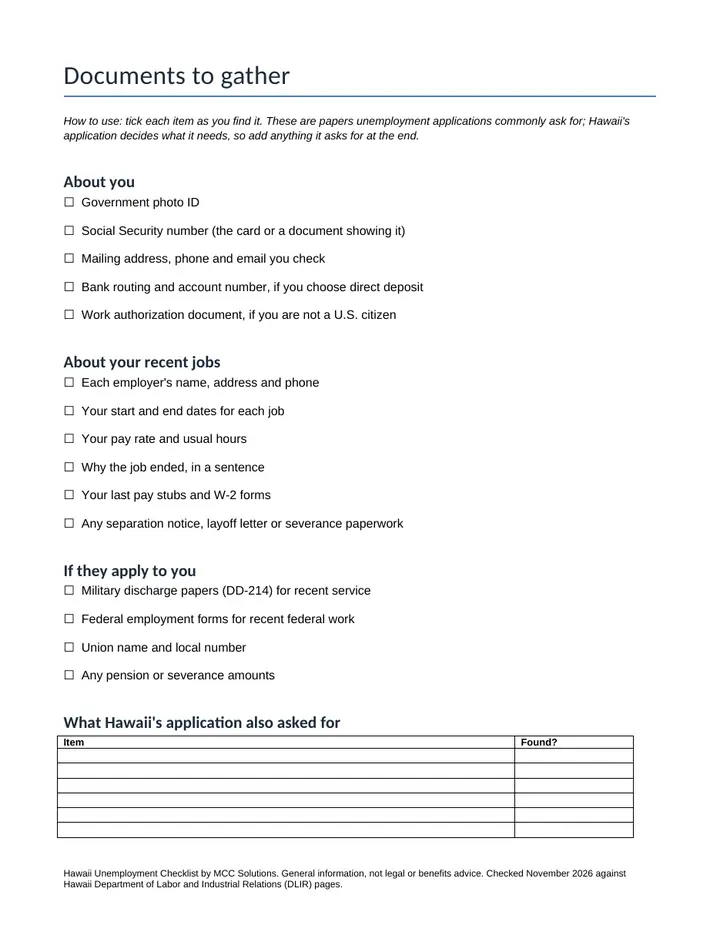
- Documents to gather. A checklist of the papers a claim usually asks for (IDs, employer names and dates, pay records, separation papers), with space for anything Hawaii's application adds.
- Printable weekly work search log. A paper version of the log with Hawaii's columns, one week per page, for claimants who prefer to write it down.
A look inside
The first pages, as you will get them
Get it
Hawaii Unemployment Checklist
Want every toolkit? The toolkit membership includes all of them, with a lower rate if you pay yearly.
Get every update for a year, $29: the Yearly Updates Pass gives you each refreshed edition we release of the kits you own. One payment, no automatic renewal.
Delivered as a zip of editable Word files and printable PDFs. For one business, your own use. General information and templates, not legal, tax or accounting advice. General information, not legal or benefits advice. Hawaii Department of Labor and Industrial Relations (DLIR) decides whether your work search meets its rules, and your own notices from it come first. MCC Solutions isn't affiliated with any state agency. Payment is handled by Stripe. If a file will not open or something looks wrong, reply to your order email and we will make it right.
Ways to get it
Just this kit, or more
Membership
$29 a month
Every kit and document pack in the store, including new ones. Cancel any time.
See the membershipQuestions
Common questions
What's in the download?
An Excel weekly work search log for Hawaii and three Word documents with matching PDFs: a start-here checklist of Hawaii Department of Labor and Industrial Relations (DLIR)'s work search rules, a documents-to-gather checklist and a printable weekly log. You get a download link by email after payment.
How many work search activities does Hawaii require each week?
At least 3 work search contacts a week, including weeks you claim partial benefits. That is in the data file we checked November 2026 against Hawaii Department of Labor and Industrial Relations (DLIR)'s own pages; your notices from the agency come first.
How do I report my work search in Hawaii?
Log each activity in the Weekly Work Search Log in your claimant portal (Daily Tasks, then Record Work Search Activity). It transfers to your weekly or biweekly certification. The agency's page: https://huiclaims.hawaii.gov.
What if something isn't confirmed?
Anything Hawaii Department of Labor and Industrial Relations (DLIR)'s pages didn't state when we checked is printed as "Not confirmed — check" with the agency's page, never guessed. In this kit that is: official list of activities, official log form, how the week is counted.
Is this legal or benefits advice?
No. It's general information and an organizer. Hawaii Department of Labor and Industrial Relations (DLIR) decides whether your work search meets its rules. MCC Solutions isn't affiliated with any state agency.
Also from MCC Solutions
Month-End Close Workbook
A real month-end close in one Excel file. It tells you when a rec does not tie, which variances still need an answer, and when the period is ready to lock.
$19
Sales-Channel Profit Tracker
Which channel makes you money, and which one only looks busy? Sales minus cost of goods, shipping, platform and card fees and event costs, by channel, by event and by month.
$24