Document pack
Timesheet and Pay Workbook: Weekly Timesheets for 25 Employees, Decimal Hours, Overtime Split and Gross Pay
Time in and time out become decimal hours, the overtime split and gross pay for each person, for a one or two-week pay period.
$19 one time · 14-day full refund · Word and PDF · download link by email
🌙 The desk is asleep. The store never is.
Every kit and ebook downloads the moment you pay, day or night. Questions get answered after we open in the morning.
Browse the storeWho it is for
Small employers, office managers and bookkeepers who track hourly staff in Excel before entering hours in payroll software.
Not the right fit if
You need net pay, tax withholding or payroll filings, or you have more than 25 hourly staff: this works out hours and gross pay only.
Why it is different
- Overtime follows the federal 40-hour week by default, with one switch for daily overtime where a state requires it.
- Handles overnight shifts, unpaid breaks and hours typed instead of times, and flags missing times.
- Not a payroll tax calculator, and it says so: gross pay only, with no withholding or deductions.
What is inside
- Timesheet and pay workbook (Excel). Settings, 25 employees, Week 1 and Week 2 timesheets, a pay period summary with regular and overtime hours and gross pay, a printable timesheet and a minutes-to-decimal converter.
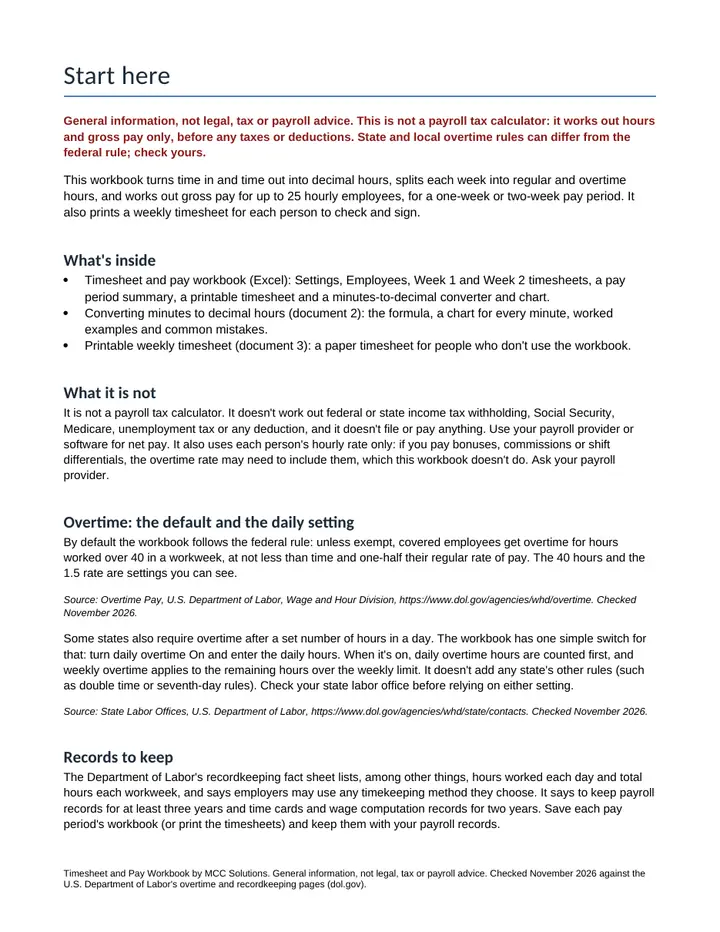
- Start here. What it does and doesn't do, the federal overtime default, the daily overtime switch, records to keep and each pay period's steps.
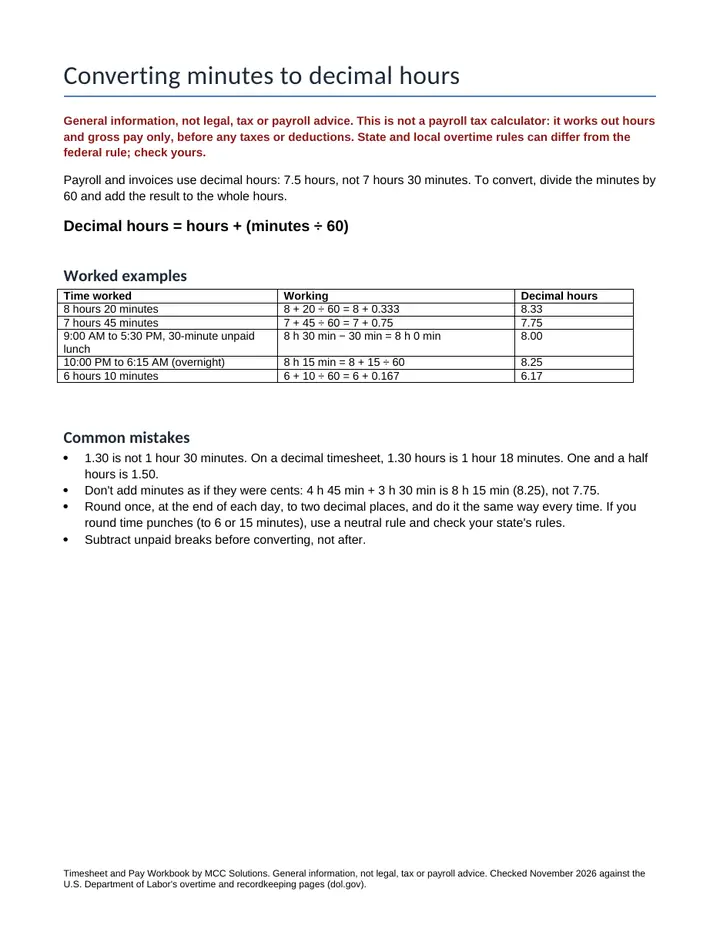
- Converting minutes to decimal hours. The formula, worked examples, common mistakes and a chart for every minute from 1 to 60.
- Printable weekly timesheet. A paper timesheet with signature lines for staff who don't use the workbook.
A look inside
The first pages, as you will get them
Get it
Timesheet and Pay Workbook
Or pay with PayPal
Uses the email and terms box above. You get the same download link by email.
Want every toolkit? The toolkit membership includes all of them, with a lower rate if you pay yearly.
Get every update for a year, $29: the Yearly Updates Pass gives you each refreshed edition we release of the kits you own. One payment, no automatic renewal.
Delivered as a zip of editable Word files and printable PDFs. For one business, your own use. General information and templates, not legal, tax or accounting advice. General information, not legal, tax or payroll advice. Not a payroll tax calculator: it works out hours and gross pay only. Overtime uses the hourly rate alone; state and local rules can differ from the federal default, so check your state labor office. Payment is handled by Stripe. If a file will not open or something looks wrong, reply to your order email and we will make it right.
Ways to get it
Just this kit, or more
Membership
$29 a month
Every kit and document pack in the store, including new ones. Cancel any time.
See the membershipQuestions
Common questions
What's in the download?
An Excel workbook (settings, 25 employees, two weekly timesheets, a pay period summary, a printable timesheet and a minutes-to-decimal sheet) and three Word and PDF documents.
Is this a payroll tax calculator?
No. It works out hours, the regular and overtime split and gross pay before any taxes or deductions. Use your payroll provider or software for withholding and net pay.
How does it handle overtime?
By default it uses the federal rule from the Department of Labor: hours over 40 in a workweek at not less than time and one-half. One switch adds daily overtime after a number of hours you set, for states that require it. Check your state labor office.
Can I enter hours instead of times in and out?
Yes. Enter time in, time out and unpaid break minutes, or hours and minutes worked. Overnight shifts are handled, and a missing time is flagged.
Is this legal or payroll advice?
No. It's a general timesheet workbook. Bonuses, commissions and state rules beyond the daily switch aren't built in; ask your payroll provider.
Free sample
Try one page first
Get a real page or file from this product by email. We send one confirmation email, and no series follows.
Also from MCC Solutions
Month-End Close Workbook
A real month-end close in one Excel file. It tells you when a rec does not tie, which variances still need an answer, and when the period is ready to lock.
$19
Sales-Channel Profit Tracker
Which channel makes you money, and which one only looks busy? Sales minus cost of goods, shipping, platform and card fees and event costs, by channel, by event and by month.
$24