Document pack
Wisconsin Notarial Certificate Wording Pack: Official Forms, Fill-In Certificates and a Mistakes Checklist
Wisconsin's acknowledgment, representative acknowledgment, jurat, signature witnessing and copy certification wording, word for word from the Wisconsin Department of Financial Institutions, notary public section's official samples, as fill-in certificates you can print or attach, with a one-page chart of which to use and a checklist of the mistakes the official sources warn about.
$15 one time · 14-day full refund · Word and PDF · download link by email
Who it is for
Notaries commissioned through the Wisconsin Department of Financial Institutions, notary public section, mobile notaries and signing agents working in Wisconsin who want Wisconsin's own certificate wording on hand, ready to fill in when a document arrives without a certificate.
Not the right fit if
You aren't a Wisconsin notary, or you only need to read the wording: it's public law and free on our Wisconsin certificate wording page. This pack doesn't decide which certificate a document needs or replace advice from an attorney.
Why it is different
- Only official sources: Notary Sample Statements, revised November 2022 (Wisconsin Department of Financial Institutions). No association templates or vendor forms.
- Every core act has an official Wisconsin form, each cited. Checked November 2026.
- The wording is public law and free on our Wisconsin page; the pack is the fill-in files, the chart and the checklist.
What is inside
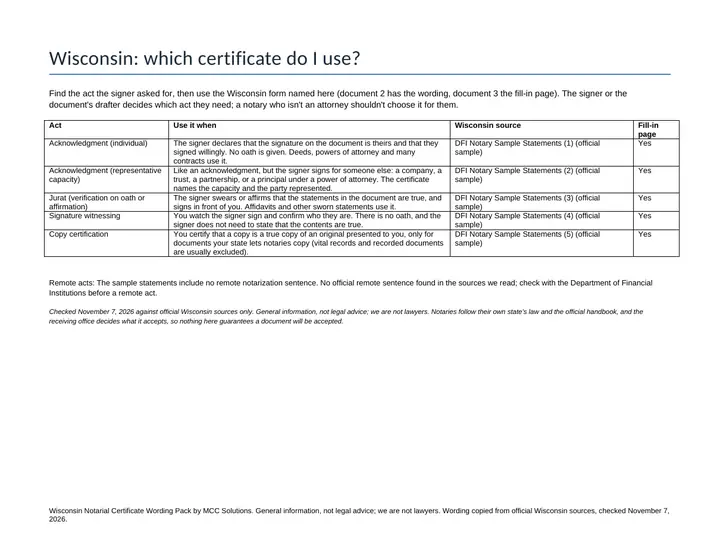
- Which certificate do I use? (Wisconsin). One page: each Wisconsin notarial act, when it's used and where its wording comes from: acknowledgment (individual) (DFI Notary Sample Statements (1)); acknowledgment (representative capacity) (DFI Notary Sample Statements (2)); jurat (verification on oath or affirmation) (DFI Notary Sample Statements (3)); signature witnessing (DFI Notary Sample Statements (4)); copy certification (DFI Notary Sample Statements (5)).
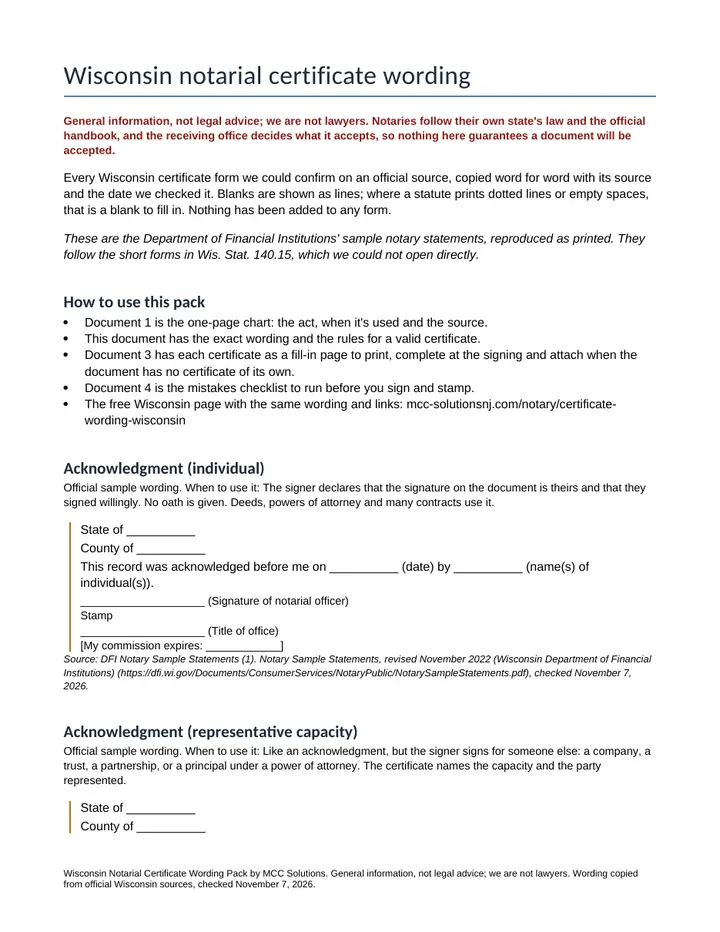
- Wisconsin certificate wording reference. Every form word for word with its source and check date. The acknowledgment reads "This record was acknowledged before me on __________ (date) by __________ (name(s) of individual(s))." and the jurat "Signed and sworn to (or affirmed) before me on __________ (date) by __________ (name(s) of individual(s) making statement)." Then what a Wisconsin certificate must contain: every document requiring notarization must include a notary statement; if it lacks one, a Wisconsin notary must write or type a complete statement; each statement has the State and County venue (the county where the notarization is done), your signature, your stamp, your title of office and your commission expiration date.
- Fill-in certificates (Word and PDF). Five certificates, one per page, for the acknowledgment (individual), acknowledgment (representative capacity), jurat (verification on oath or affirmation), signature witnessing and copy certification, with blanks for the venue, date, names and your signature, seal and commission details. Remote acts: The sample statements include no remote notarization sentence. No official remote sentence found in the sources we read; check with the Department of Financial Institutions before a remote act.
- Common-mistakes checklist. Four mistakes from Notary Sample Statements, revised November 2022 (Wisconsin Department of Financial Institutions), among them: stamping and signing a document that has no notary statement; DFI says you must write or type a complete one; writing your home county instead of the county where the notarization is done; using the acknowledgment for a sworn statement; use the verification on oath or affirmation. Plus a before-you-sign check.
A look inside
The first pages, as you will get them
Get it
Wisconsin Notarial Certificate Wording Pack
Want every toolkit? The toolkit membership includes all of them, with a lower rate if you pay yearly.
Get every update for a year, $29: the Yearly Updates Pass gives you each refreshed edition we release of the kits you own. One payment, no automatic renewal.
Delivered as a zip of editable Word files and printable PDFs. For one business, your own use. General information and templates, not legal, tax or accounting advice. General information, not legal advice; we are not lawyers. Notaries follow their own state's law and the official handbook, and the receiving office decides what it accepts, so nothing here guarantees a document will be accepted. Check the Wisconsin Department of Financial Institutions, notary public section for changes. Payment is handled by Stripe. If a file will not open or something looks wrong, reply to your order email and we will make it right.
Ways to get it
Just this kit, or more
Membership
$29 a month
Every kit and document pack in the store, including new ones. Cancel any time.
See the membershipQuestions
Common questions
What do I get and how is it delivered?
The Wisconsin Certificate Wording comes as a zip with four documents, each as an editable Word file and a printable PDF: Which Certificate Do I Use, Wisconsin Certificate Wording, Fill In Certificates, and Common Mistakes Checklist. The download link arrives by email after payment.
Will it open on a Mac, Google Sheets or my phone?
The PDFs open in any PDF reader, including on a phone. To edit, open the Word files in Word, Google Docs or LibreOffice on a Mac or PC. If a file will not open or something looks wrong, reply to your order email and we will make it right. If it is not right for you, email us within 14 days of buying for a full refund.
Is this legal or tax advice?
General information, not legal advice; we are not lawyers. Notaries follow their own state's law and the official handbook, and the receiving office decides what it accepts, so nothing here guarantees a document will be accepted.
Is it the right fit for me?
It is made for wisconsin notaries, mobile notaries and signing agents who want the state's own certificate wording on hand, ready to fill in when a document arrives without a certificate. Skip it if you aren't a Wisconsin notary, or you only need to read the wording: it's public law and free on our Wisconsin certificate wording page.
Free sample
Try one page first
Get a real page or file from this product by email. We send one confirmation email, and no series follows.
Buy it with the others
Bundle
All-States Notary Certificate Wording Pack
This product plus 38 more, in one download.
$149 instead of $585 separately
New Jersey Notary Starter Kit
The paperwork a new notary has to build from scratch, ready to print or edit: a journal laid out for what New Jersey's manual says to record, checklists, forms and client emails.
$29